2026-11-01 · 10 min
mendcode, a coding agent cli you can shape however you want
Why I built MendCode my way. Profiles, tiers, different engines and code reviews, with the reasons behind them and measurements against other CLIs.
I used every coding CLI I could get my hands on. Each one had something I wanted to keep and something I wanted to change. pi is small and gets out of the way. Claude Code and Codex have a balanced day-to-day flow. OpenCode shows you everything. None of them let me take a little of each and make it mine.
So I built MendCode. It's free, open source under the Apache 2.0 license, and the code is on GitHub. You connect the model; its use still comes with your provider's costs and limits.
I'm Obed, a developer from Panama. I started programming during the pandemic, before AI could write a line for me, and almost everything I make ends up public on my GitHub. I like seeing someone take something I made somewhere I hadn't thought of.
Tiers: I don't want to choose between small and complete
I wanted to change the tool I spend hours working in. Sometimes I want just a prompt and an answer; other times I need to see several sessions, review a diff or follow a long-running task. I didn't want to pick another CLI each time. That's why MendCode has three starting points, minimalist, balanced and full, and lets you turn each feature on or off separately.
Minimalist is for having the agent without much interface around it. Balanced adds things I use when working in a repo, such as the code graph and sub-agents. Full puts more within reach for experimenting. These are starting points, not fixed bundles: if I only want one feature from another tier, I can enable it without taking everything else.
That's what I wanted to keep from the tools I tried: getting close to pi's simplicity or having more information visible without switching applications. MendCode growing shouldn't force you to use all of it.
Profiles: sharing my CLI, not just its colors
A theme changes the appearance. I wanted to change how I work, too: the keys, prompt, views, tools and commands. Profiles bundle those decisions so I can save my setup or try someone else's. They apply over mine; turning them off restores what I had.
Being able to undo that matters. If trying a setup means overwriting my configuration and rebuilding it by hand afterward, I end up trying nothing. I want sharing a profile to mean sharing what works for someone, while letting whoever installs it keep their own choices.
I also want to tell the agent "remove that panel" or "change how answers look." That's why the documentation ships inside the program and customization has a preview. The agent can look up how to change it instead of inventing settings. When a setting isn't enough, there are extensions and replaceable views. You shouldn't have to wait for me to approve an idea to have it in your terminal.
Choosing an interface without committing to one engine
I didn't want to abandon an engine that already works for me, either. MendCode has its own, but can run Claude Code, Codex, pi or ACP agents inside the same screen, each with its own login and capabilities. I use Claude Code and Codex this way every day. Choosing an interface shouldn't mean choosing a single provider.
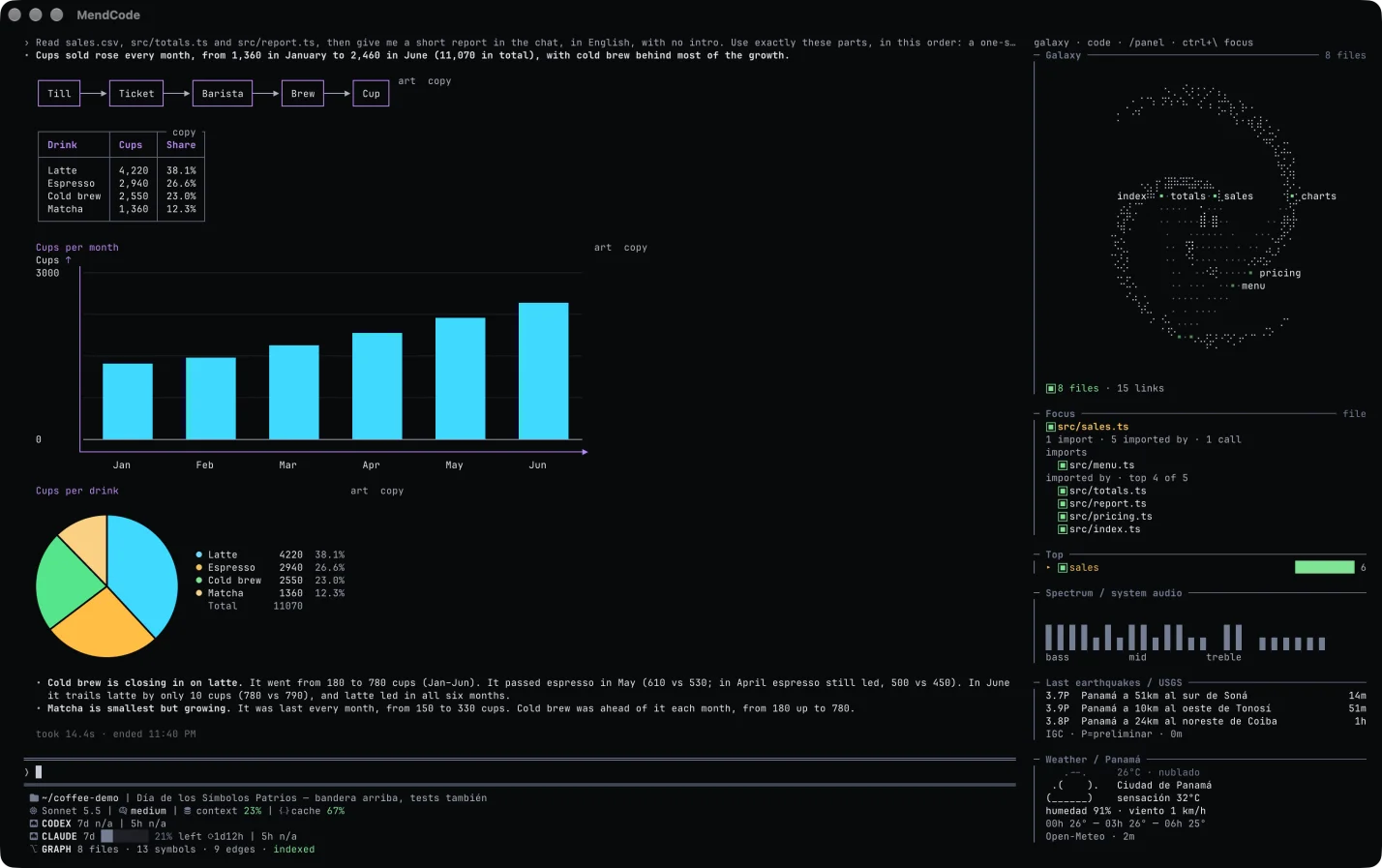
That's my terminal in the screenshot. I wanted to read a table or diagram where I was already working, without opening another application.
PR review: finding something isn't enough to publish it
An agent that finds ten possible problems hasn't necessarily done a good review. If I have to disprove nine to find one real defect, it handed the work back to me. I want a comment to justify changing the code, and a reviewer that can finish without saying anything when it finds no defect.
That's why /pr review separates finding from verifying. A first session reads the change and proposes findings with evidence in the code. A second, fresh, read-only session is asked to try to refute each one. The normal profile publishes only what that second pass confirms; strict can also include plausible findings, labeled as such. It's an additional check, not a guarantee that the model is right.
The review also receives the diff and, when a graph is available, the callers and callees of the changed code. For example, changing what a function returns can break a consumer that doesn't appear in the diff at all. That context helps it look for the failure beyond the edited lines, rather than just commenting on how they look.
The review follows what happens next: a normal push reviews what's new and re-checks open findings in the affected files. If they no longer reproduce, it can resolve their GitHub threads. I don't want to discuss a fixed problem or review the whole change again on every push.
And I want to control who reviews and with what. On my machine it uses the model I choose and my gh login, without another review service subscription or a GitHub App. The repository sets the rules from the base branch: a PR can't turn off its own review. Publishing needs permission; fixing and pushing is a separate capability you enable.
That's why I prefer it to asking a CLI to "review this diff" and handling the follow-up myself. I don't have an evaluation proving it finds more bugs than every other reviewer. If it runs out of budget, it must say what it didn't review, not call the PR clean.
The reviewer reference covers the controls and limits. It can keep working with the terminal closed while the machine and daemon stay running; if the machine is off, you need a server or the GitHub workflow.
More features shouldn't make the basics heavy
That's also why I worked on memory and loading features on demand: I don't want to pay for a web server or a reviewer when I'm just typing a question. The daemon keeps the sessions so their work doesn't depend on an open window.
This comparison was published on November 3, 2026, on a Mac M4 Pro with 24 GB, with the tools signed in and answering the same read-only question. RSS and footprint show memory at the prompt / after the reply; disk is what that session stored.
| CLI | RSS | Footprint | Disk per session |
|---|---|---|---|
| MendCode minimalist | 129 / 138 MB | 63 / 67 MB | 2.5 KB |
| MendCode balanced | 130 / 139 MB | 64 / 66 MB | 2.6 KB |
| MendCode full | 131 / 140 MB | 64 / 69 MB | 2.6 KB |
| pi | 133 / 139 MB | 81 / 88 MB | 2.85 KB |
| Claude Code (Haiku) | 289 / 314 MB | 146 / 152 MB | 302 KB |
| Codex CLI | 310 / 507 MB | 215 / 330 MB | 43 KB |
| OpenCode 1.19.5 | 1,220 / 1,324 MB | 551 / 591 MB | 28 KB |
The method and results count the whole process tree, not just the screen. The model was gpt-6-luna except for Claude Code, which used Haiku; MendCode and pi show medians of three launches. It's one measurement, not a promise for every project. There's a worse result too: in that test MendCode used 1.1 to 1.5 seconds of CPU per turn against pi's 0.2.
Context costs something too
I don't want to spend context having the agent work out where a function lives every time. The graph gives it symbols and calls with files and lines, so it can read what it needs. Compaction preserves the original request and unfinished tasks: summarizing a conversation shouldn't change what I asked for. And protecting the cache matters because a long session sends context again at each step.
In an evaluation against Codex CLI on October 6, 2026, with gpt-6-luna, medium effort and 12 tasks repeated three times, the result was:
| Codex CLI | MendCode balanced | |
|---|---|---|
| Solved | 32/36 | 33/36 |
| Input tokens | 3.40M | 1.00M |
What interests me is keeping a similar result while sending less context. These are short tasks, one model and one machine: this doesn't establish general superiority or measure PR review quality. It doesn't mean a 70% smaller bill, either; uncached input was 0.46M against 0.38M. The evaluation's limits are public.
Long-running work without keeping it all in my head
A chat is enough for a small change. With several tasks, I want to separate who does what, see what's left and know which check decides that something is finished. That's what sub-agents and workflows are for, with budgets and stop conditions. Sessions can talk to each other so I don't have to copy answers between them. Worktrees remain an option when I need to isolate changes, not a requirement for every agent.
Memory addresses another repetition: explaining how I work again. I want to decide what's saved and be able to correct or delete it; Dream can propose memories from recent sessions, but is enabled separately. Areas separate work memories, models and permissions from personal ones. The agent knowing me better shouldn't mean mixing all my projects together.
These decisions fit together. I can use the same model as in another CLI, but change what information it receives, how work is divided and what I can control myself. That's the difference I'm looking for in MendCode, rather than adding features to a list.
Keys and chats: what stays on my machine
A .env in the repo is still the place for what the project itself needs: your app, scripts or CI read it, and it lives with the code. What I didn't want was pasting a key into the chat, or leaving it in a file just so the agent could run a command. That's what /env is for. You add a name and a hidden value, or paste a whole .env and pick which names to save. The values go into an encrypted local vault and never show up on screen, in prompt history or in the chat. They apply to the project by default, or to one session, or globally.
In MendCode's own engine, the model only gets the names, its shell commands receive the values as environment variables, and a value that shows up in a command's output becomes ‹env:NAME›. Claude Code, Codex, pi and ACP agents get them in their process environment too, but print through their own tools, so MendCode can't mask them there. Importing a .env doesn't change or encrypt the original file. And a command that can read a value can still leak it, so approvals and the sandbox still matter.
/privacy is something else: it encrypts your chats on disk. It's off by default. Turned on, it encrypts the local database (sessions, histories, drafts, memories, settings) plus attachments and saved outputs, so cat, grep or a SQLite reader can't read them. It's encryption at rest, not end-to-end: the provider still sees what's sent to it. Exports, earlier backups, files in your repo (your .env included) and the engines' own logs stay outside it. The key lives in keys/; back it up separately, because without it the chats don't open. On large histories it also costs more RAM, CPU and disk writes.
In the minimalist tier both commands are hidden; /tier balanced or the command editor brings them back. The keys and limits are in the environment and privacy reference.
What it took to get here
These are the cumulative numbers up to v0.0.4 Beta 1, not the program's current size or a measure of its quality:
| v0.0.4 Beta 1 | |
|---|---|
| Code | about 1.1M lines added on main, MendCode v1 (507K) plus v2 (596K) |
| Tokens | over 30B, cache included; the 78 PRs of v0.0.4 Beta 1 took about 3B in three days |
| Time | from June (first v1 commit) and September 30 (first v2 commit) to this launch |
| Price | free, Apache 2.0 |
It's still a 0.x. macOS is where I've used it most; Linux and Windows have builds and smoke tests, but less real use. Not every integration offers the same capabilities.
I put the features, screenshots, installation and documentation on mendcode.dev, rather than turning this post into another manual. If you try it, I'd like to know what you wouldn't want to lose from your current CLI and what you'd change. You can open an issue, share a profile or contribute code.